





- Posts: 377
- Thank you received: 5
Online Forums
Technical support is provided through Support Forums below. Anybody can view them; you need to Register/Login to our site (see links in upper right corner) in order to Post questions or issues. You do not have to own a commercial license in order to use the OPC Labs support. Our team is actively monitoring the forums, and provides replies as soon as possible.
Please read Rules for forum posts before reporting your issue or asking a question. OPC Labs team is actively monitoring the forums, and replies as soon as possible.
Various technical information can also be found in our Knowledge Base. For your convenience, we have also assembled a Frequently Asked Questions page.
Do not use the Contact page for technical issues.
Error BC30002 Type 'OpcLabs.EasyOpc.DataAccess.Forms.Browsing.DAItemDialog' is n
20 Sep 2023 09:53 #12172
by micham
Replied by micham on topic Error BC30002 Type 'OpcLabs.EasyOpc.DataAccess.Forms.Browsing.DAItemDialog' is n
Hi,
Thank you for your answer. Now the program is built with no errors. However, when I run my project in debug mode, I get this exception.
The variable MyFindValueAfter is a string. Don't know why EasyOPC crashes on this variable...
System.TypeInitializationException
HResult=0x80131534
Message=The type initializer for 'OpcLabs.EasyOpc.DataAccess.Forms.Browsing.DADialog' threw an exception.
Source=OpcLabs.EasyOpcForms
StackTrace:
at OpcLabs.EasyOpc.DataAccess.Forms.Browsing.DADialog..ctor()
at OpcLabs.EasyOpc.DataAccess.Forms.Browsing.DAItemDialog..ctor(IContainer container)
at EBO_Browse.Form1.InitializeComponent() in \MyBin\Proj-VS2017\EBO-OPC Client\Configuration(4)\Form1.Designer.vb:line 107
at EBO_Browse.Form1..ctor() in\MyBin\Proj-VS2017\EBO-OPC Client\Configuration(4)\Form1.vb:line 34
Inner Exception 1:
FileLoadException: Could not load file or assembly 'System.Runtime.CompilerServices.Unsafe, Version=5.0.0.0, Culture=neutral, PublicKeyToken=b03f5f7f11d50a3a' or one of its dependencies. The located assembly's manifest definition does not match the assembly reference. (Exception from HRESULT: 0x80131040)
Inner Exception 2:
FileLoadException: Could not load file or assembly 'System.Runtime.CompilerServices.Unsafe, Version=4.0.4.1, Culture=neutral, PublicKeyToken=b03f5f7f11d50a3a' or one of its dependencies. The located assembly's manifest definition does not match the assembly reference. (Exception from HRESULT: 0x80131040)
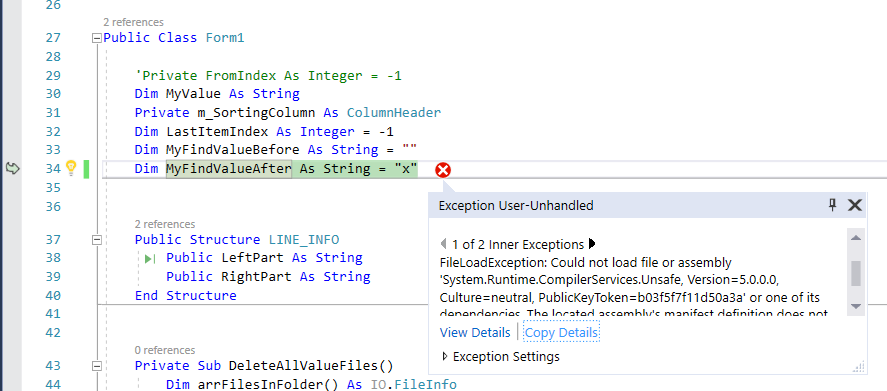
Please advise.
Thank you.
Michael
Thank you for your answer. Now the program is built with no errors. However, when I run my project in debug mode, I get this exception.
The variable MyFindValueAfter is a string. Don't know why EasyOPC crashes on this variable...
System.TypeInitializationException
HResult=0x80131534
Message=The type initializer for 'OpcLabs.EasyOpc.DataAccess.Forms.Browsing.DADialog' threw an exception.
Source=OpcLabs.EasyOpcForms
StackTrace:
at OpcLabs.EasyOpc.DataAccess.Forms.Browsing.DADialog..ctor()
at OpcLabs.EasyOpc.DataAccess.Forms.Browsing.DAItemDialog..ctor(IContainer container)
at EBO_Browse.Form1.InitializeComponent() in
\MyBin\Proj-VS2017\EBO-OPC Client\Configuration(4)\Form1.Designer.vb:line 107at EBO_Browse.Form1..ctor() in
\MyBin\Proj-VS2017\EBO-OPC Client\Configuration(4)\Form1.vb:line 34Inner Exception 1:
FileLoadException: Could not load file or assembly 'System.Runtime.CompilerServices.Unsafe, Version=5.0.0.0, Culture=neutral, PublicKeyToken=b03f5f7f11d50a3a' or one of its dependencies. The located assembly's manifest definition does not match the assembly reference. (Exception from HRESULT: 0x80131040)
Inner Exception 2:
FileLoadException: Could not load file or assembly 'System.Runtime.CompilerServices.Unsafe, Version=4.0.4.1, Culture=neutral, PublicKeyToken=b03f5f7f11d50a3a' or one of its dependencies. The located assembly's manifest definition does not match the assembly reference. (Exception from HRESULT: 0x80131040)
Please advise.
Thank you.
Michael
Please Log in or Create an account to join the conversation.


20 Sep 2023 09:12 #12171
by support
Replied by support on topic Error BC30002 Type 'OpcLabs.EasyOpc.DataAccess.Forms.Browsing.DAItemDialog' is n
Hello.
I will answer this, but similarly with many other questions and issues you have, these have nothing to do with our product specifically. It is a general knowledge for which you should seek advice elsewhere.
The instructions tailored specifically to QuickOPC are here: opclabs.doc-that.com/files/onlinedocs/QuickOpc/Latest/User%2...es%20in%20Visual%20Studio.html
There may be differences that depend on Visual Studio version/revision and its configuration.
Regards
I will answer this, but similarly with many other questions and issues you have, these have nothing to do with our product specifically. It is a general knowledge for which you should seek advice elsewhere.
The instructions tailored specifically to QuickOPC are here: opclabs.doc-that.com/files/onlinedocs/QuickOpc/Latest/User%2...es%20in%20Visual%20Studio.html
There may be differences that depend on Visual Studio version/revision and its configuration.
Regards
Please Log in or Create an account to join the conversation.
20 Sep 2023 09:02 #12170
by micham
Replied by micham on topic Error BC30002 Type 'OpcLabs.EasyOpc.DataAccess.Forms.Browsing.DAItemDialog' is n
Hi,
Thank you for your answer. I have removed all QuickOPC assemblies.
I have downloaded the 2 files:
opclabs.quickopc.5.71.334.nupkg
opclabs.quickopc.forms.5.71.334.nupkg
Can you please explain how do I add Package References to these files?
Thank you.
Michael
Thank you for your answer. I have removed all QuickOPC assemblies.
I have downloaded the 2 files:
opclabs.quickopc.5.71.334.nupkg
opclabs.quickopc.forms.5.71.334.nupkg
Can you please explain how do I add Package References to these files?
Thank you.
Michael
Please Log in or Create an account to join the conversation.
20 Sep 2023 08:25 #12169
by support
Replied by support on topic Error BC30002 Type 'OpcLabs.EasyOpc.DataAccess.Forms.Browsing.DAItemDialog' is n
Michail.
Your project file is completely wrong, in terms of referencing the QuickOPC product.
There are two basic problems:
1) It references wrong version (5.63)
2) It uses assembly references instead of Package (NuGet) references.
You need to:
1. In Visual Studio, remove ALL references to QuickOPC assemblies.
2. Then in Visual Studio, add Package References to OpcLabs.QuickOpc and OpcLabs.QuickOpc.Forms , version 5.71, from www.nuget.org .
Regards
Zbynek Zahradnik
Your project file is completely wrong, in terms of referencing the QuickOPC product.
There are two basic problems:
1) It references wrong version (5.63)
2) It uses assembly references instead of Package (NuGet) references.
You need to:
1. In Visual Studio, remove ALL references to QuickOPC assemblies.
2. Then in Visual Studio, add Package References to OpcLabs.QuickOpc and OpcLabs.QuickOpc.Forms , version 5.71, from www.nuget.org .
Regards
Zbynek Zahradnik
Please Log in or Create an account to join the conversation.
20 Sep 2023 07:57 #12168
by micham
Replied by micham on topic Error BC30002 Type 'OpcLabs.EasyOpc.DataAccess.Forms.Browsing.DAItemDialog' is n
Hi,
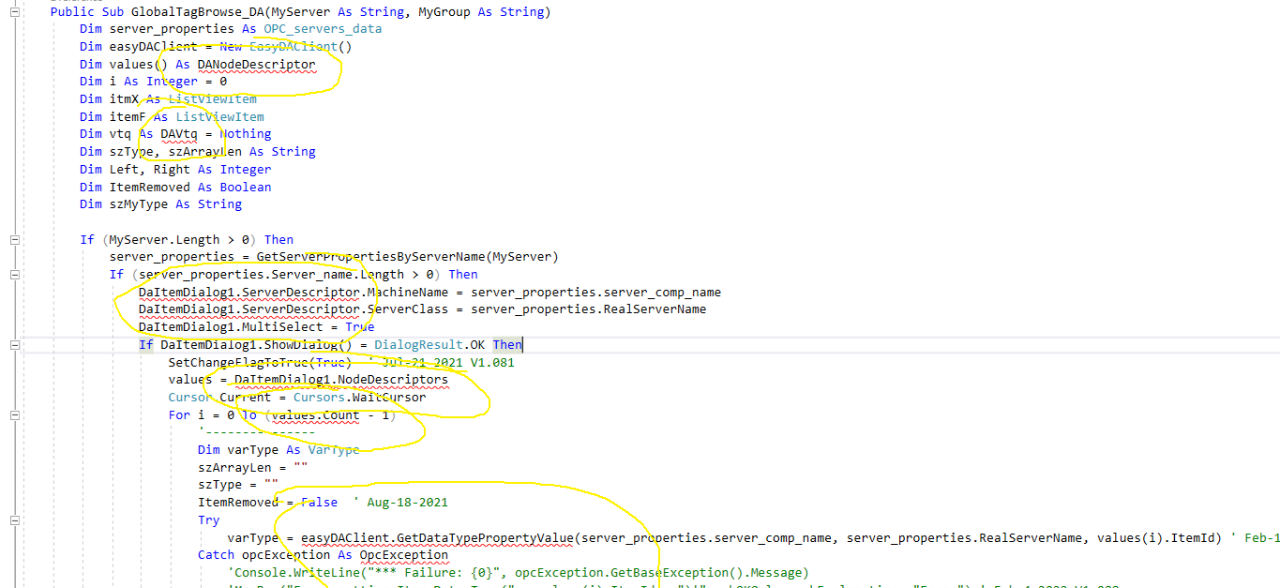
I think I made some progress. Now I only have build errors. See the screen capture below.
I get the following errors:
1.
Severity Code Description Project File Line Source Suppression State
Error BC30002 Type 'DAVtq' is not defined. EBO_Browse\MyBin\Proj-VS2017\EBO-OPC Client\Configuration(4,66)\Form1.vb 1 Build N/A
2. DANodeDescriptor is undefined
3. DaItemDialog1 is undefined
I appreciate your help.
Thanks
I think I made some progress. Now I only have build errors. See the screen capture below.
I get the following errors:
1.
Severity Code Description Project File Line Source Suppression State
Error BC30002 Type 'DAVtq' is not defined. EBO_Browse
\MyBin\Proj-VS2017\EBO-OPC Client\Configuration(4,66)\Form1.vb 1 Build N/A2. DANodeDescriptor is undefined
3. DaItemDialog1 is undefined
I appreciate your help.
Thanks
Please Log in or Create an account to join the conversation.
20 Sep 2023 06:34 #12167
by support
Replied by support on topic Error BC30002 Type 'OpcLabs.EasyOpc.DataAccess.Forms.Browsing.DAItemDialog' is n
Hello.
There is nothing specific in QuickOPC in relation to package upgrades.
For this reason, there are no guides to do that. In principle the problem is with the tooling (Microsoft).
You can post here (or email to me, if privacy is a concern) the *.vbproj files, I will check if the package references in them are correct. They are there in XML, visible, anyway.
Regards
There is nothing specific in QuickOPC in relation to package upgrades.
For this reason, there are no guides to do that. In principle the problem is with the tooling (Microsoft).
You can post here (or email to me, if privacy is a concern) the *.vbproj files, I will check if the package references in them are correct. They are there in XML, visible, anyway.
Regards
Please Log in or Create an account to join the conversation.
19 Sep 2023 17:46 #12166
by micham
Replied by micham on topic Error BC30002 Type 'OpcLabs.EasyOpc.DataAccess.Forms.Browsing.DAItemDialog' is n
Hi,
I followed your instructions but got other errors....
Do you have a step-by-step guide that explains how to switch from version 2021.1 VB.net project to version 2023.1?
Thank you.
Michael
I followed your instructions but got other errors....
Do you have a step-by-step guide that explains how to switch from version 2021.1 VB.net project to version 2023.1?
Thank you.
Michael
Please Log in or Create an account to join the conversation.
19 Sep 2023 12:54 #12164
by support
Replied by support on topic Error BC30002 Type 'OpcLabs.EasyOpc.DataAccess.Forms.Browsing.DAItemDialog' is n
Upgrading NuGet packages is tricky in Visual Studio. It commonly fails to operate properly.
I suggest to make a backup copy of the solution, then do Clean on the solution, exit Visual Studio, remove all ".vs" hidden folders, restart Visual Studio, check that Package References are referencing the right versions of QuickOPC, and that you have also upgraded the OpcLabs.QuickOpc.Forms package.
Regards
I suggest to make a backup copy of the solution, then do Clean on the solution, exit Visual Studio, remove all ".vs" hidden folders, restart Visual Studio, check that Package References are referencing the right versions of QuickOPC, and that you have also upgraded the OpcLabs.QuickOpc.Forms package.
Regards
Please Log in or Create an account to join the conversation.
19 Sep 2023 12:41 #12162
by micham
Error BC30002 Type 'OpcLabs.EasyOpc.DataAccess.Forms.Browsing.DAItemDialog' is n was created by micham
Hi,
After upgrading to version 2023.1 , when building the application I am getting this error:
Severity Code Description Project File Line Source Suppression State
Error BC30002 Type 'OpcLabs.EasyOpc.DataAccess.Forms.Browsing.DAItemDialog' is not defined.
EBO_Browse\MyBin\Proj-VS2017\EBO-OPC Client\Configuration(3,40)\Form1.Designer.vb 1 Build N/A
Any idea why?
Thank you.
Michael

After upgrading to version 2023.1 , when building the application I am getting this error:
Severity Code Description Project File Line Source Suppression State
Error BC30002 Type 'OpcLabs.EasyOpc.DataAccess.Forms.Browsing.DAItemDialog' is not defined.
EBO_Browse
\MyBin\Proj-VS2017\EBO-OPC Client\Configuration(3,40)\Form1.Designer.vb 1 Build N/AAny idea why?
Thank you.
Michael
Please Log in or Create an account to join the conversation.
Moderators: support, vaclav.zaloudek
Time to create page: 0.232 seconds